Play PokéBonk Free Online
The original browser game by Charcher, embedded here. Click inside the game before using the keyboard.
Controls
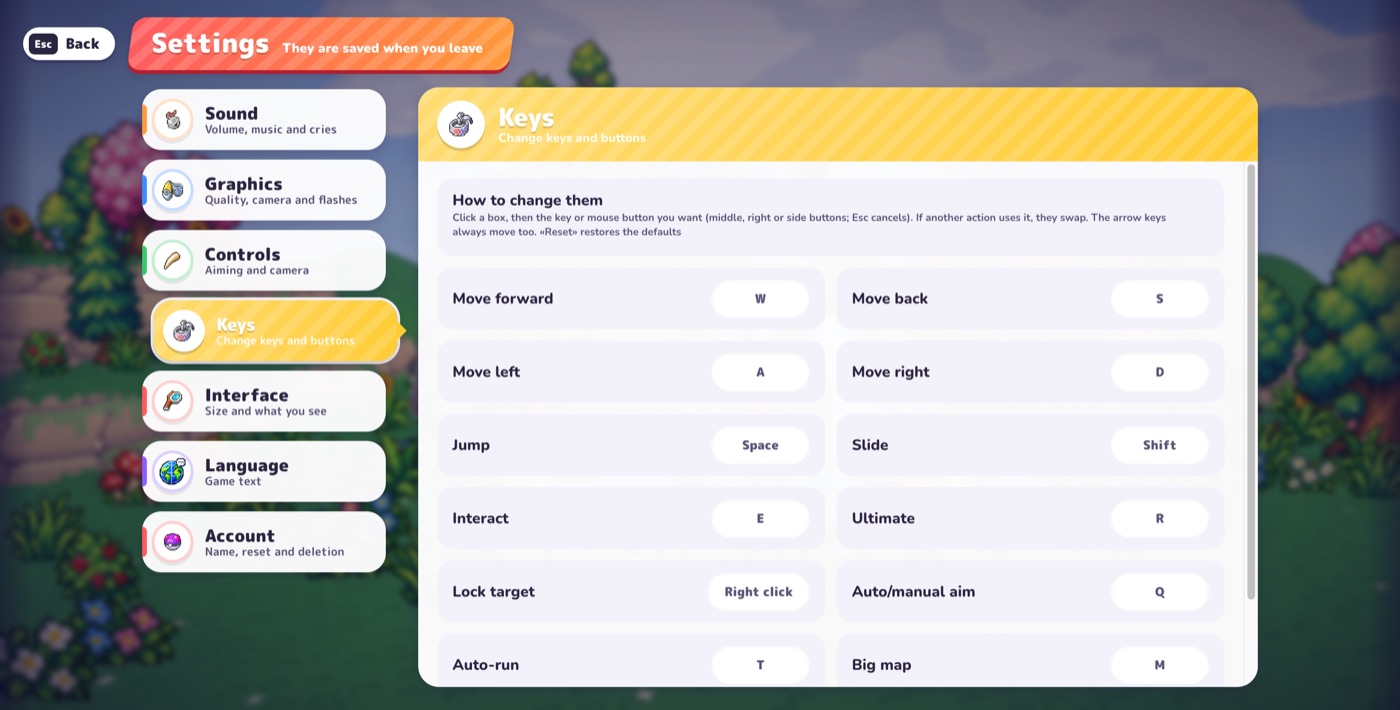
On desktop: WASD or arrow keys to move, mouse to look, Space to jump, Shift to slide, R for your Ultimate, E to interact, Esc to pause. Press Q to switch between Automatic and Manual aiming. Bindings can be changed in Settings → Keys.
Frequently asked questions
How do I play PokéBonk in fullscreen?
Press the ⛶ button on the game frame. Press ✕ or Esc to exit. If your browser blocks fullscreen, the frame expands to fill the window instead.
What are the PokéBonk controls?
WASD or arrow keys move, the mouse looks, Space jumps, Shift slides, R is your Ultimate, E interacts, Esc pauses, and Q switches between Automatic and Manual aiming.
What if the game stays blank?
Use “Open Original” to play on pokebonk.com. The game needs JavaScript and WebGL, so also update your browser and enable hardware acceleration.
Sources & verification
Facts on this page come from public testing of the game (Beta v0.5.5–v0.6.2), checked in-game and written up in our own words. The game is now v0.7.2 and details may have changed; we have not re-verified every number. Spotted a mistake? support@pokebonkwiki.com
Related pages
- How to Play PokéBonk: Beginner Guide
- PokéBonk Starters: Bulbasaur vs Charmander vs Squirtle
- PokéBonk Level-Up Guide: Moves, Enhancements & Vitamins
- PokéBonk Economy Guide: Poké Balls, Meowth, Selling & Training
- PokéBonk Difficulty Guide: Normal vs Hard vs Nightmare
- PokéBonk Boss Guide: Fury, Exhaustion and How to Beat Guardians
- PokéBonk Clans, Friends & Co-op: How They Work (and What’s Coming)
- PokéBonk Patch Notes
- PokéBonk Wiki
Last updated: